> For the complete documentation index, see [llms.txt](https://wiki.nushackers.org/llms.txt). Markdown versions of documentation pages are available by appending `.md` to page URLs; this page is available as [Markdown](https://wiki.nushackers.org/orbital/readme-1/html/forms.md).

# HTML Forms

An HTML form allows users to submit data to a server for processing. Let's add some functionality to our previous HTML form to allow queries to Google Search.

## The necessary attributes

First, we need to add some attributes to the `<form>` tag. But what attributes does it accept? Let's look at two of them.

### The `method` attribute

This specifies the HTTP request method to use. By default, this method is "GET", but there are 4 other possibilities: "POST", "DELETE", "PUT" and "PATCH". In our case, Google Search expects a GET request, so the "GET" value is fine. This means we do not need to specify a `method` this time.

### The `action` attribute

This attribute specifies the URL to submit the form data to. Let's figure out what the action URL should be for our form.

Go to the [Google homepage](https://www.google.com) and enter some search query. Then look at the URL bar and see what address it went to.

{% hint style="info" %}
Ignore everything after the `?` in the URL bar; these are the search parameters and will be used later.
{% endhint %}

<figure><img src="/files/fSVevMSHkNcMWOE4dua9" alt=""><figcaption></figcaption></figure>

<figure><img src="/files/iRil4B1nhwuXl03zOhyC" alt=""><figcaption></figcaption></figure>

As we see above, the URL it went to was [`https://www.google.com/search`](https://www.google.com/search). Hence this is the URL we need to submit our form data to. Let's add this attribute to our `<form>` tag:

```html
<form action="https://www.google.com/search">...</form>
```

### The `name` attribute

This attribute is given to an input field, and specifies the name of the input parameter. In this case, what name do we give our input?

Consider the URL bar again. Right after the `?`, you should see something along the lines of `q=whateveryoutyped`.

<figure><img src="/files/IZVDTYddwq10cZl6xoVd" alt=""><figcaption></figcaption></figure>

This is how form data is arranged in a GET request. The name of the parameter, following by an equals sign `=`, followed by the value of the parameter itself. For multiple parameters, they are separated by ampersand symbols `&`. In general, in a GET request, the URL bar looks like this:

```
https://www.domain.com/action-url?name1=value1&name2=value2&name3=value3
```

For Google Search, most of the parameters are for Google's internal service: type of browser, operating system, cookies, google account signed in, etc. But the one we want is the first one: `q=`

Here `q` is the name of the parameter, and it stands for (presumably) query. Whatever you searched up would be the value. So now we know what name to give our `<input>` field:

```html
<input name="q" placeholder="query" required>
```

## Putting it together

Your form by now should look like this:

```html
<form action="https://www.google.com/search">
    <input name="q" placeholder="query" required>
    <button type="submit">Submit</button>
</form>
```

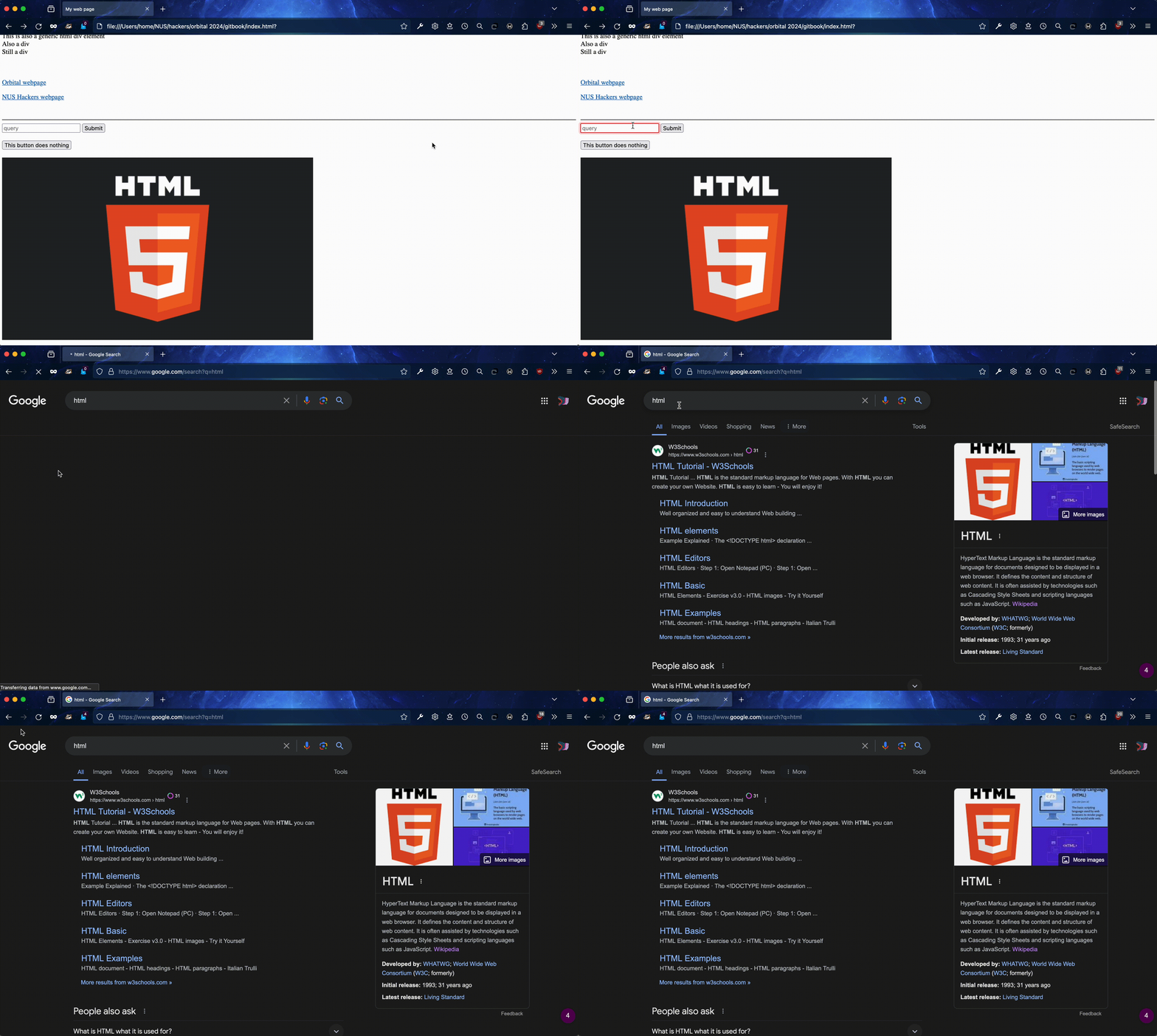
Once you reload the page, you won't notice any visible changes. But when you enter a query into the form field, you'll be redirected to a Google Search page for the query as below.

<figure><img src="/files/35q0QZy2xv444jVwUUpR" alt=""><figcaption></figcaption></figure>

## Next steps

We're pretty much done with HTML for now. The next section of the guide will explain a little about the Browser Inspector in Firefox, a tool that will be very useful when we move on to CSS right after.

---

# Agent Instructions
This documentation is published with GitBook. GitBook is the documentation platform designed so that both humans and AI agents can read, navigate, and reason over technical content effectively. Learn more at gitbook.com.

## Querying This Documentation
If you need additional information that is not directly available in this page, you can query the documentation dynamically by asking a question.

Perform an HTTP GET request on the current page URL with the `ask` query parameter, and the optional `goal` query parameter:

```
GET https://wiki.nushackers.org/orbital/readme-1/html/forms.md?ask=<question>&goal=<endgoal>
```

`ask` is the immediate question: it should be specific, self-contained, and written in natural language.
`goal` is optional and describes the broader end goal you are ultimately trying to accomplish on behalf of the user. GitBook uses it to tailor the answer towards what is most useful for that goal.

The response will contain a direct answer to the question and relevant excerpts and sources from the documentation.

Use this mechanism when the answer is not explicitly present in the current page, you need clarification or additional context, or you want to retrieve related documentation sections.
